

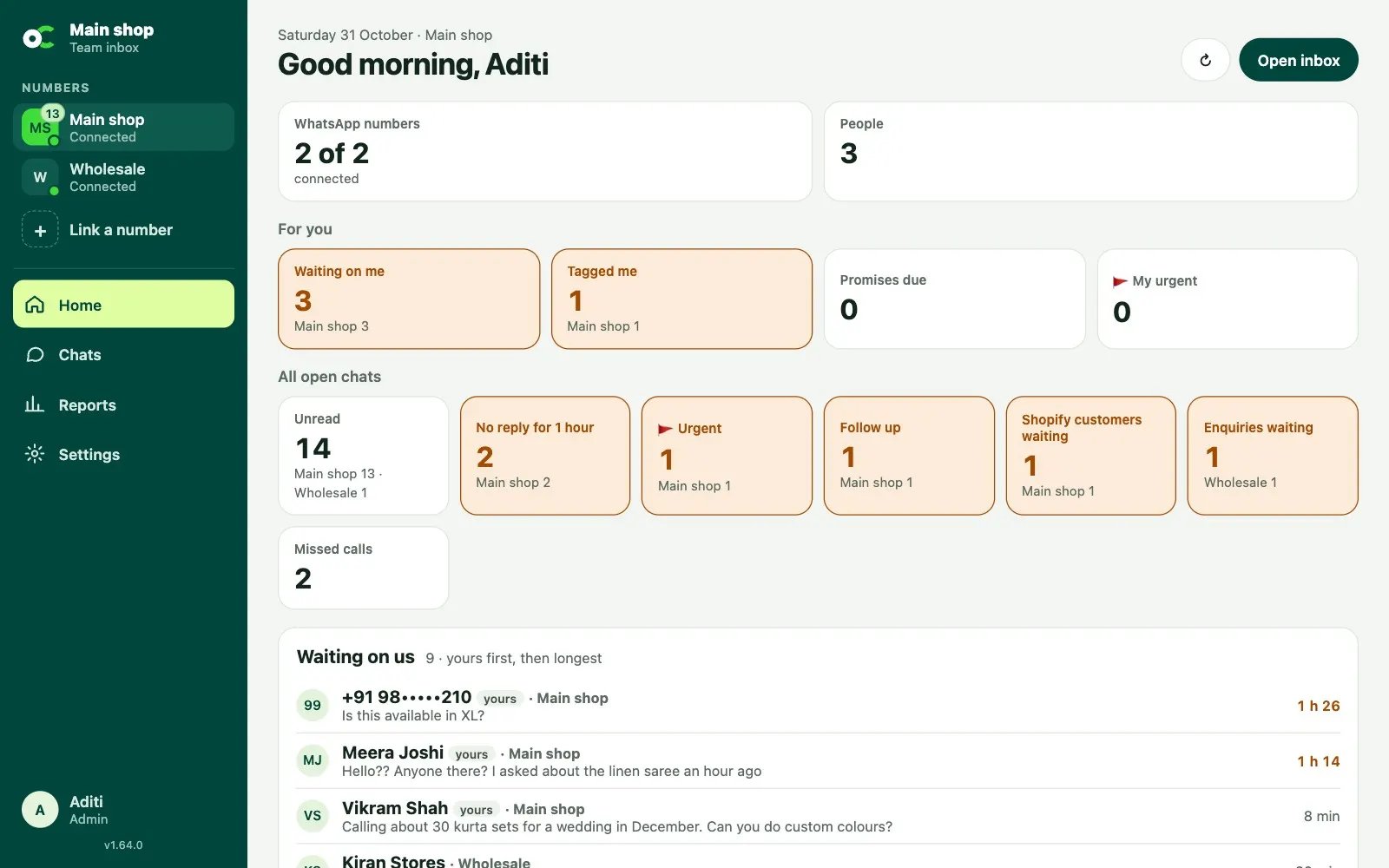
For admins: is everything working?
Admins see four boxes at the top, the same as on the Settings page:- WhatsApp numbers: how many are connected. If one isn’t, the box turns orange and names it.
- People: how many are in the team (on a plan, out of how many it includes).
- Plan and AI credits left this month, when you’re on a plan. The credits box turns orange when a fifth or less is left.
Getting started
In a new inbox, admins get a short list of first steps: link a WhatsApp number, add your team, add quick replies, connect your Shopify store (when your plan includes it) and turn on notifications on this device. Tap a step to go straight there. The list goes away once everything is done, or tap Hide this.For you
Four boxes about your own chats:- Waiting on me: chats you own or help on where the customer wrote last.
- Tagged me: chats where someone @tagged you in a note you haven’t read yet.
- Promises due: your chats on Follow up, where a promise like “will check and update” still needs an answer.
- 🚩 My urgent: your chats flagged urgent.
All open chats
The same counts for every open chat you can see:- Unread: chats waiting for you.
- No reply for 1 hour: customers who have waited more than an hour.
- 🚩 Urgent and Follow up.
- Shopify customers waiting: customers who have ordered from your store and are waiting for a reply (when Shopify is connected).
- Enquiries waiting: bulk website enquiries not answered yet (with the website enquiries add-on).
Waiting on us
The customers who wrote last and are still waiting for a reply, on all your numbers: your own chats first, then the longest wait. The wait turns orange after 1 hour and red after 4. Tap a name to open the chat.Lists to work through
Each of these shows when it applies to your business. Tap a name to open the chat.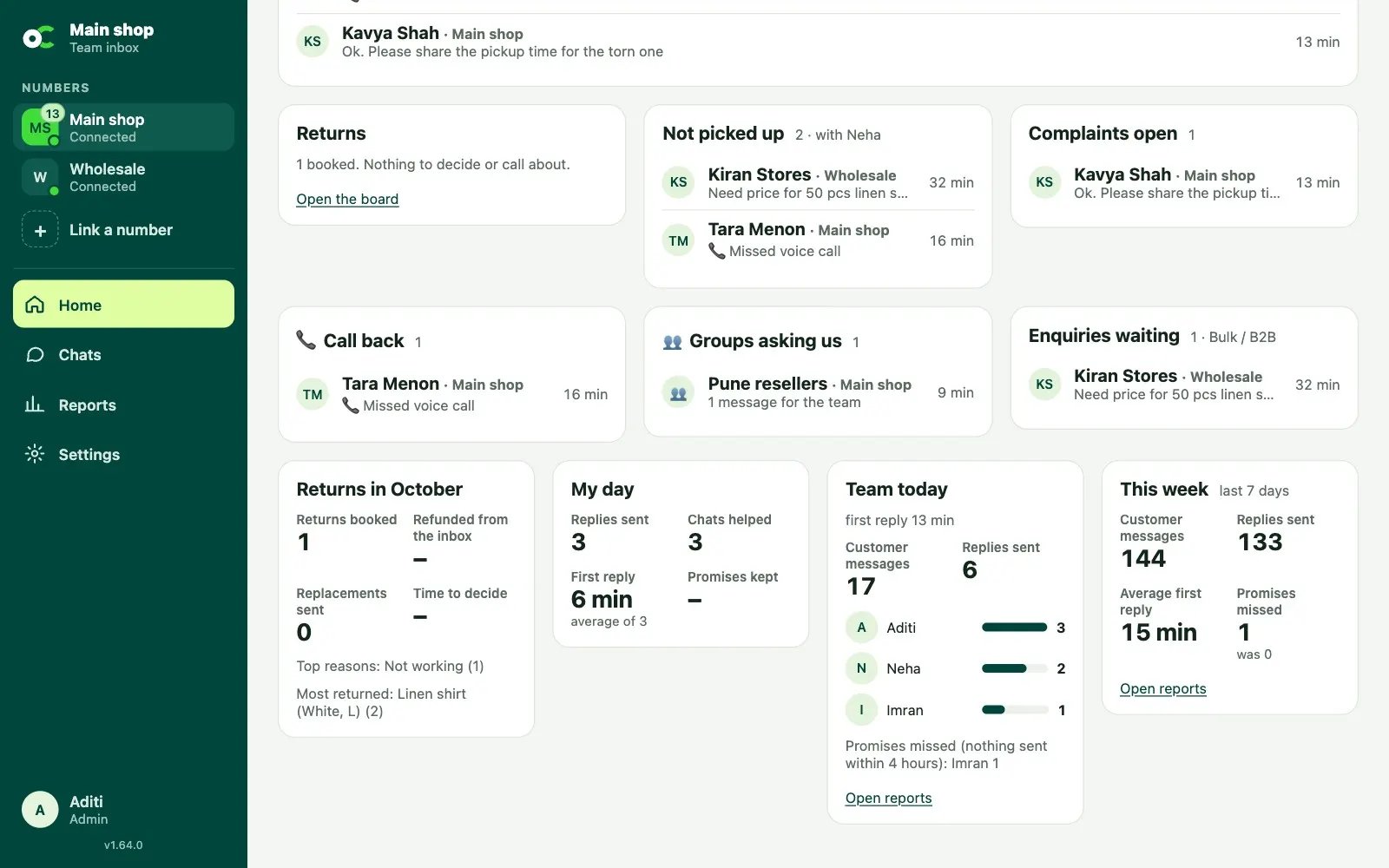
- Not picked up (admins): new chats still with the person who gets new chats, waiting more than 15 minutes for a reply.
- Complaints open (admins): open chats with the Complaint label, whether the automatic check or a person put it there.
- 📞 Call back: customers whose last message was a missed or declined call, with no reply since (when call lines are on).
- 👥 Groups asking us: WhatsApp groups you follow where someone mentioned your number or replied to you. Each one stays until you open it.
- Enquiries waiting: bulk website enquiries the team hasn’t answered yet.
Returns board
With the courier returns add-on, admins and people with ↩️ Returns switched on see every return in four columns:
When nothing is waiting for a decision or a call, the board folds into one line (for example “2 on the way back”). Tap Open the board to see it.
Each column shows the first three, then how many more. Tap a card to open that customer’s chat. The button at the top, like 2 returns to decide, jumps to the board. On a phone, the columns sit one under another, with At the warehouse first.
Next to the board:
- Needs a call: pickups or deliveries that failed, and parcels lost or coming back.
- Returns this month: see Courier returns. It also lists customers who returned more than once in the last 90 days. Tap a name to open their chat.
My day
Your own day so far, on all numbers: replies you sent, chats you helped on, how fast you answered on average, and promises kept. Admins can hide this from team members in Settings → Team and passwords (“Show team members their own day on Home”). Admins always see their own.Team today and this week
Admins also see:- Team today: customer messages, replies sent, the average time to a first reply, a bar for each person’s replies, and any promises a person missed (nothing sent within 4 hours).
- This week: customer messages, replies, average first reply and promises missed in the last 7 days, compared with the 7 days before.